If you've ever searched "how do AI receptionists work," you've probably noticed a lot of marketing language and not a lot of substance. This guide skips the sales pitch and walks through the actual mechanics: what happens from the moment a phone rings to the moment the AI hangs up (or hands the call to a person).
AI receptionists are becoming a normal part of how small and mid-sized businesses handle inbound calls, largely because missed calls are missing revenue; many callers who reach voicemail simply call a competitor instead. Below, we break down exactly how an AI voice receptionist listens, understands, and responds, what "learning your business" really involves, and where the technology still needs a human safety net.
Key Takeaways
Three-step loop: Listen (speech-to-text), understand (intent detection), and respond (voice synthesis) repeatedly turn by turn until the call ends.
Not a phone tree. Callers speak naturally instead of pressing buttons; the system figures out where the call should go.
Live booking, not just messages. A genuine AI receptionist checks real calendar availability and confirms appointments while the caller is still on the line.
Setup is largely automatic. Most systems build their knowledge base by reading a business's website and uploaded documents, then a person reviews and refines it.
Human handoffs are a safety net. Urgent, unusual, or emotionally sensitive calls get routed to a real person, along with a summary, so the caller doesn't repeat themselves.
Providers vary a lot. Some only take messages; others book, log, and text follow-ups automatically. Testing a live demo call reveals the difference fast.
What Is an AI Receptionist?
An AI receptionist is software that answers business phone calls, listens to natural speech, and responds conversationally like a human receptionist, but is available continuously. It typically handles:
Answering common questions (pricing, hours, services)
Booking appointments directly into a calendar
Taking and logging messages
Collecting caller details and qualifying leads
Transferring urgent or complex calls to a team member
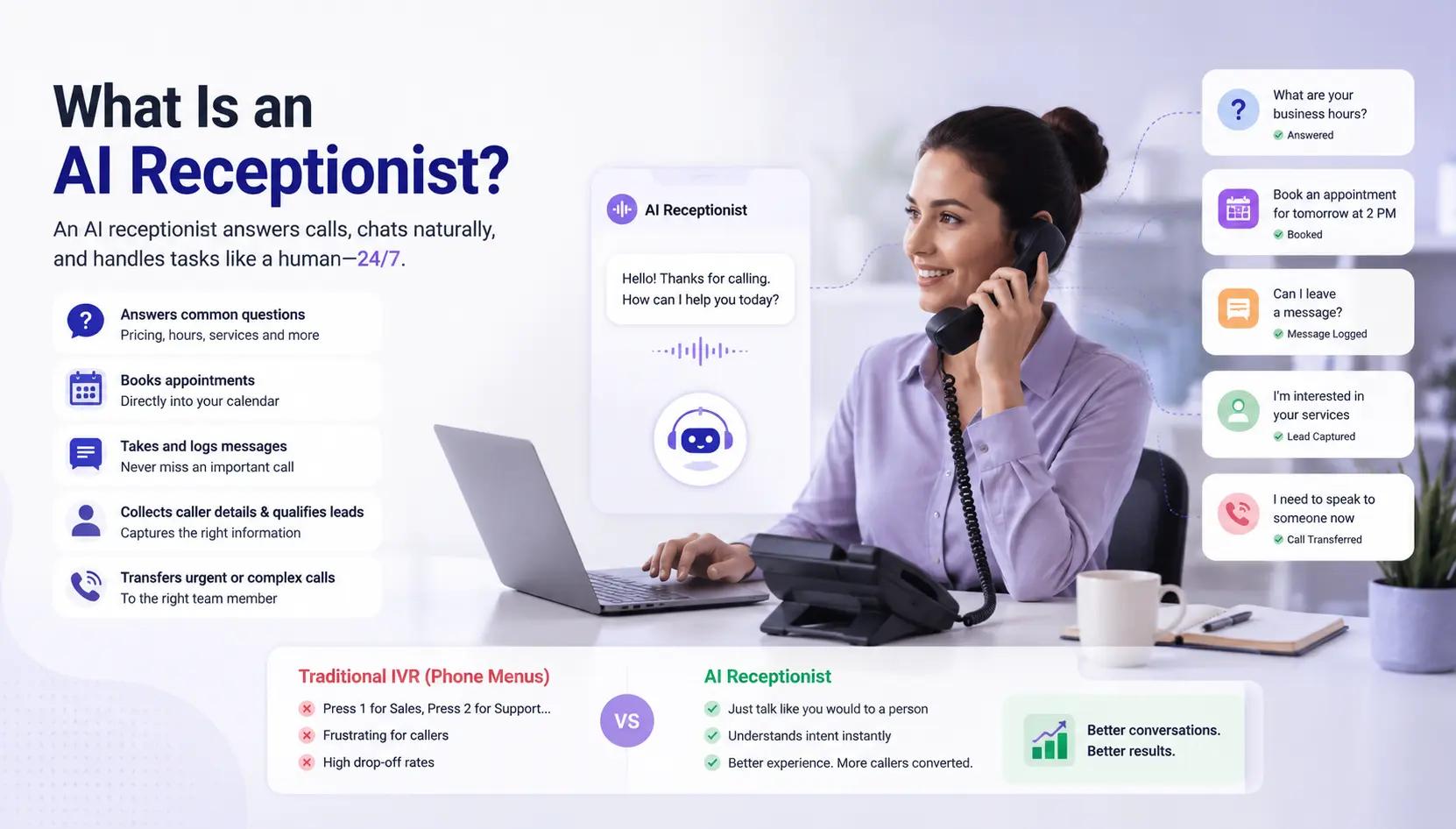
For decades, the main alternative to a live receptionist was an automated phone menu (IVR): "Press 1 for Sales, Press 2 for Support." IVR systems were cheaper than staffing a phone line, but callers generally disliked navigating them. An AI receptionist removes that trade-off: the caller just talks, and the system interprets the request the way a person would, without menus or forced voicemail.
Market Context
Market research firms track this space under a few overlapping labels AI receptionist," "virtual receptionist service," and "outsourced virtual receptionist" and the figures differ noticeably between reports, so treat any single number as a directional estimate rather than an exact forecast.
According to Industry Research's virtual receptionist service market report, the global market is valued at roughly USD 17.8 billion in 2026, projected to grow to around USD 49.6 billion by 2035, at a compound annual growth rate near 12%.
A separate Business Research Insights market report estimates the same category differently closer to USD 4.6 billion in 2026 growing to USD 10.9 billion by 2035 which illustrates how much these forecasts shift depending on methodology and market definition.
Research focused specifically on AI receptionist market statistics puts that narrower segment at roughly USD 2.3 billion in 2025, growing much faster over 26% CAGR as voice AI adoption accelerates. The specific numbers vary by firm, but the direction across every report is consistent: adoption of AI-based call handling is rising quickly.
How Does an AI Virtual Receptionist Handle Calls? (The Core Process)
Once the phone actually rings, three things happen in rapid succession, repeating turn after turn until the call ends.
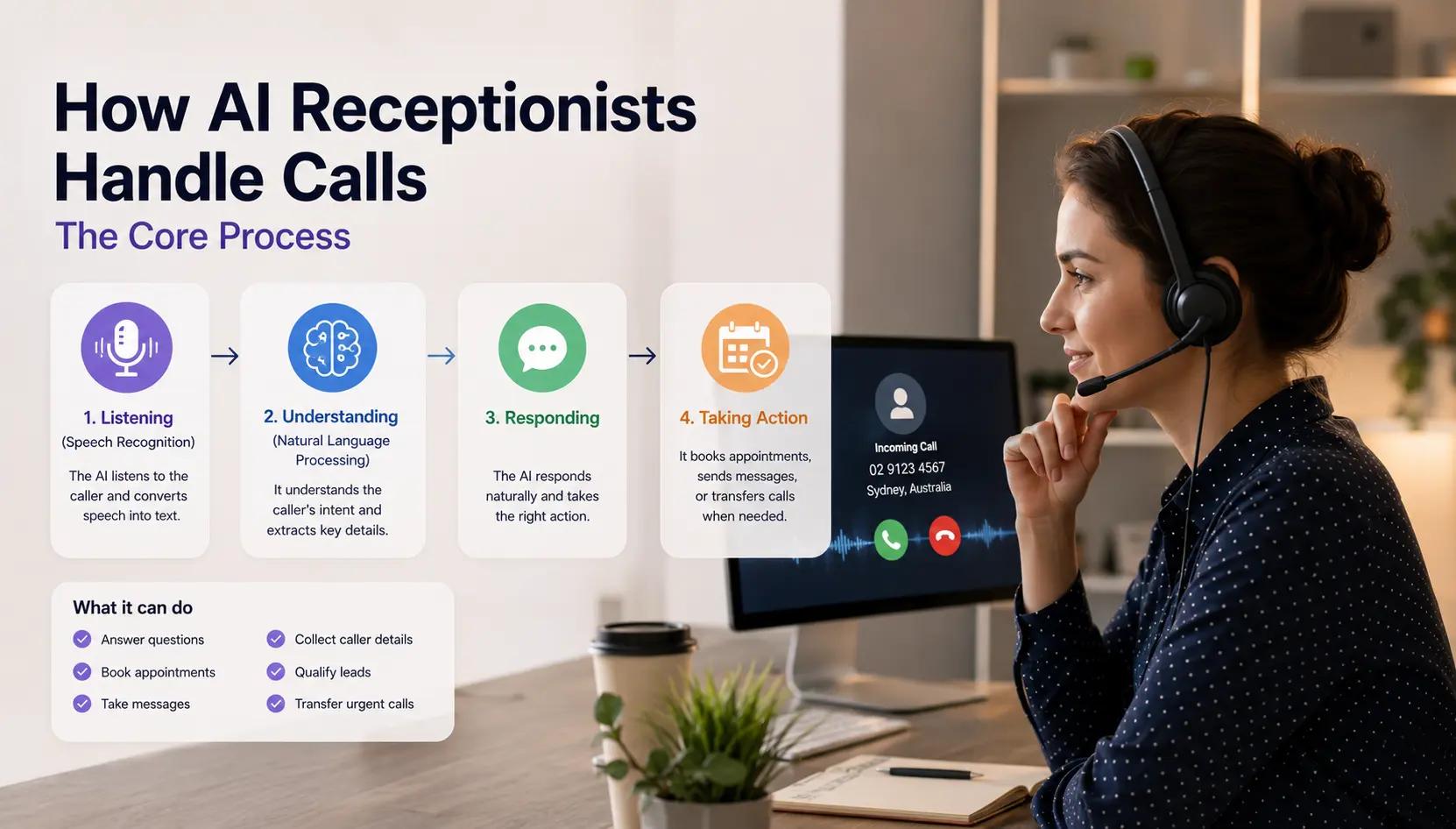
Step 1: Listening (Speech Recognition)
The moment a caller speaks, Automatic Speech Recognition (ASR) converts their voice into text, word for word, while filtering out background noise. This step must be accurate, because any transcription error cascades into every step that follows. That's why voice AI companies invest heavily in this layer, as handling different accents, poor mobile signals, and overlapping speech all add complexity.
Step 2: Understanding (Natural Language Processing)
Transcribed text is only useful once the system knows what it means. This is the job of Natural Language Processing (NLP) and large language models, which work out the caller's intent rather than matching keywords.
For example, "I was hoping to get someone out to look at my hot water system this week" isn't a keyword match for "plumbing." The system must recognize it as a service request, with an implied timeframe that likely needs scheduling.
Modern systems also track context across an entire call, not just one sentence. If a caller later says, "Actually, can we make it Thursday instead?" the system must know "it" refers to the appointment discussed earlier. That contextual memory is what separates a genuine AI receptionist from the rigid voice bots of a decade ago.
Step 3: Responding
Once intent is understood, the system decides what action to take, then generates a spoken reply using voice synthesis (text-to-speech). Modern synthetic voices vary pace and tone enough that many callers don't immediately realize that they are speaking with a software. Responses are typically generated dynamically rather than pulled from a fixed script, so the reply reflects the specific conversation rather than a canned answer.
These three steps listen, understand, and respond continuously until the call resolves. That loop is the honest, complete answer to "how do AI receptionists work."
Step 4: Learning the Business (Before Any Call Happens)
Before an AI receptionist can take a single call, it needs a working knowledge base about the business it represents. Providers generally build this in one of two ways:
Method | How it works | Typical use case |
Automatic | The system crawls the business website and any uploaded documents, extracting services, prices, hours, and policies on its own | Fast setup, good starting draft |
Manual | The business owner or a team member type of information directly into the platform | Filling gaps, adding nuance the website doesn't cover |
Hybrid (most common) | AI builds a first draft from the website; a person reviews and corrects it | Best accuracy with minimal manual effort |
How an AI Virtual Receptionist Behaves in Practice
Understanding the technical loop is one thing, here's what it actually looks like across a normal business day.
Routing by meaning, not menus. A caller who says "I need to talk to billing" is routed to billing. A caller describing an urgent issue at 11 p.m. is routed according to whatever emergency rule the business has configured.
Booking appointments for mid-call. The system connects to a calendar (Google Calendar, Outlook, etc.), checks real-time availability, offers open slots, and confirms the booking before the call ends rather than taking a message and hoping someone follows up later.
Logging everything in a CRM. After each call, the caller's name, number, reason for calling, and a summary are pushed into a CRM, so no lead is lost to a forgotten note.
Sending SMS follow-ups. Before hanging up, the system can text a booking confirmation, a link, or business hours information, and these small touches help reduce no-shows.
Answering routine questions. Using its knowledge base, it can answer questions about pricing, services, or hours immediately, without holding time.
Do You Need to Know How to Code?
No. Most providers require no coding and no lengthy configuration. A business typically provides a website URL or uploads documents like FAQs and service lists, and the system builds its understanding of what the business offers, when it's open, and what counts urgent. Initial setup for most platforms takes a matter of minutes though reviewing the first week or two call transcripts to refine answers is a good practice. If you're setting this up as part of a broader operations checklist, the business.gov.au small business toolkit, is a useful starting point for templates and guidance beyond the AI tool itself.
From there, a business usually chooses how the AI operates: as a full 24/7 receptionist, as overflow coverage for busy periods, or for specific scenarios only (e.g., after-hours calls).
What Happens When a Call Gets Tricky?
No AI system handles every call correctly, especially long, ambiguous, or emotionally charged ones, and any provider claiming otherwise is worth scrutinizing.
The standard behavior: when a caller raises something urgent, unusual, or emotionally difficult, a well-built system recognizes this and transfers the call to a designated team member, attaching the caller's details and a summary of the conversation so far. The caller shouldn't have to repeat themselves. Businesses typically define the rules for what triggers a handoff and where those calls are routed.
Practical tip: If you're comparing providers, test this specific behavior on a live demo call before signing up. It's the feature that matters most on the day you actually need it.
Comparison: AI Receptionist vs. Traditional Answering Machine vs. IVR Phone Tree
Feature | AI Receptionist | Answering Machine / Voicemail | IVR Phone Tree |
Caller interaction | Natural conversation | One-way message only | Button-press menus |
Availability | 24/7 | 24/7 (passive) | 24/7 (passive) |
Appointment booking | Live, during the call | Not possible | Rarely, and clunky |
Lead logging | Automatic, into CRM | Manual, if followed up | Manual |
Urgent call handling | Rule-based transfer to a human | None | Limited routing |
Caller experience | Generally positive | Often frustrating | Frequently disliked |
Common Mistakes Businesses Make When Choosing an AI Receptionist
Skipping the review step. Letting the AI's auto-generated knowledge base go live without checking it for outdated prices, hours, or services.
Not defining escalation rules. Failing to specify what counts as "urgent" means genuinely urgent calls may not get transferred quickly enough.
Choosing a message-only provider and expecting bookings. Some tools only take messages for follow-up rather than confirming appointments live. Read the feature list carefully.
Ignoring call transcripts after launch. The first two weeks of transcripts usually reveal gaps in the knowledge base that are quick to fix.
Not asking about data handling. Skipping questions about encryption, storage location, and whether data is ever resold is especially important in healthcare, legal, or financial services.
The Australian Cyber Security Centre's small business guidance is a good checklist to run any new vendor against before sharing customer data with them.
Expert Tips for Choosing an AI Receptionist
Test the handoff, not just the greeting. Say something ambiguous or urgent on a demo call and see how the system reacts.
Check calendar integration first. Confirm it supports the calendar you already use (Google Calendar, Outlook, or another system) before comparing anything else.
Ask where transcripts and recordings are stored, how long they're retained, and whether the data is encrypted in transit and at rest.
Review pricing structure carefully. Compare cost per minute, included minutes, and whether there are setup fees or contract lock-ins.
Start with a free trial using your own real callers, not a generic demo script, so you can judge accuracy against your actual customer base.
Where Hello22 AI Fits
Hello22 AI offers AI receptionists built for small and large businesses, currently available in Australia, Canada, New Zealand, the United States, and the UK, following the same listen-understand-respond process described above. Key features include:
Natural-sounding English voices, selectable from the platform
Live booking directly into Google Calendar during the call
Every lead pushed into a CRM or webhook of your choice, with free CRM setup included
Urgent calls forwarded to your team with full conversation context
Data encrypted in transit and at rest, and never resold
Pricing: Plans start at $49/month plus 200 minutes, with no setup fees or long-term contracts. A 14-day free trial lets you test the system against your own real callers rather than a generic demo script.
Worth knowing upfront: Hello22 AI is in early access and currently supports English only, with additional languages planned for future release.
Conclusion
At its core, an AI receptionist listens, understands, and responds in a continuous loop until the caller gets what they came for. Behind that loop sits a knowledge base built from a business's website, uploaded documents, or manually entered details, plus a set of rules determining when a real person needs to step in. None of this requires technical skill to set up, but the quality of implementation varies significantly between providers.
Some systems book appointments live and log every lead automatically; others just take a message and hope for a follow-up. Some route emergencies to a real person immediately; others let them go to voicemail. Before choosing a provider, a live demo call or a free trial using your own callers is the most reliable way to judge whether a given AI receptionist actually fits how your business operates.
lian Information Commissioner.
Frequently asked questions
How do AI receptionists work with my existing phone number?
Many providers can keep your existing number, though most also offer a new dedicated number. Calls can be handled by AI around the clock or only during specific hours, and these settings are usually adjustable at any time.
Will callers know they're talking to an AI?
Sometimes, though less often than people expect, since modern voice synthesis sounds close to humans. Many providers configure the system to disclose upfront that the caller is speaking with a virtual assistant. Most callers respond well to this, since they get an immediate answer rather than waiting for a voicemail callback.
How does an AI receptionist function after hours?
The same way it does during business hours it can answer questions and schedule appointments at 2 a.m. as easily as at 2 p.m. Businesses can also configure specific after-hours calls to be routed to an on-call mobile number based on set criteria.
Can it really book appointments, or does it just take messages?
A properly built AI receptionist checks a live calendar and confirms the booking during the call itself. If a provider only takes a message for someone to follow up on later, it's functionally closer to an answering machine with a more natural voice.
What about strong accents or poor phone reception?
Most modern AI voice systems handle a wide range of accents reasonably well. When the system genuinely can't understand a request, the correct behavior is to ask a clarifying question or transfer to a human not to guess and proceed incorrectly.
How long does setup take for an AI receptionist?
Usually, a matter of minutes for the initial setup: providing a website URL, uploading an FAQ or services document, and setting basic rules. It's worth reviewing the first week or two call transcripts afterward to tighten up any inaccurate answers.
Is my callers' information safe?
This depends entirely on the provider, so ask directly: where is data stored, is it encrypted in transit and at rest, and is it ever sold or shared with third parties? Businesses in healthcare, legal, or financial services should get these answers in writing before signing up, and confirm the arrangement complies with relevant privacy regulations in their jurisdiction in Australia, that means checking the vendor's handling of customer data against the Australian Privacy Principles set out by the Office of the Australian Information Commissioner.